10 Best AI App Builders 2026 — And Why bootstr.ai Is the Only GitHub-Native Dev-First Platform
This in-depth guide compares the leading AI app builders in 2026 and explains the single biggest difference that makes bootstr.ai unique.
 Written by Arystan K.
Introduction
AI app builders changed software development forever. In 2026 the landscape offers everything from drag-and-drop no-code tools to developer-centric scaffolding engines that generate full stack apps from natural language.
This article synthesizes what we learned from leading reviews and product writeups and presents a practical, factual comparison of the top platforms available today, plus a detailed explanation of how bootstr.ai differs from each.
Why AI App Builders Matter in 2026
Modern AI app builders accelerate idea→MVP velocity, reduce routine engineering work, and enable smaller teams to deliver products faster.
They fall into a few categories:
- Prompt-to-app generators
- Visual low-code builders
- AI-assisted IDEs
- Hybrid tools
Each category solves a different problem — from visual prototypes to production-grade code — and each has tradeoffs in ownership, flexibility, and long-term maintainability.
Quick Comparison: Top 10 AI App Builders (2026)
| Platform | Best for | Free tier | Strengths | Weaknesses |
|---|---|---|---|---|
| bootstr.ai | Dev-first full-stack, GitHub-native | No (requires paid Cursor + GitHub) | Code generated into user's GitHub; no vendor lock-in; Cursor workflow | Requires GitHub & paid Cursor; developer familiarity expected |
| Lovable | Fast MVPs (React + Supabase) | Yes | Quick prototypes; full-stack scaffolding | Complex logic needs manual work |
| Bolt.new | Browser-based AI IDE | Yes | In-browser IDE; live preview | Browser limits for heavy backends |
| Vibe Coding | AI workflows + app generation | Yes | Automation & integrations | Emerging platform | still maturing |
| DronaHQ AI | Internal tools & CRUD dashboards | Yes | Integrations; visual builder | Not focused on consumer full-stack apps |
| Bubble AI | No-code web apps | Yes | Drag-and-drop; non-technical friendly | No real code export; vendor lock-in |
| ToolJet | Open source internal tools | Yes | Self-hostable; secure | Less automation than prompt-to-app tools |
| FlutterFlow | Cross-platform UI | Yes | Pixel-perfect UI; mobile focus | Backend must be built separately |
| Cursor IDE | AI code editing for developers | No (paid tiers) | Context aware editing & refactor | Not an app generator on its own |
| GitHub Copilot | AI code assistant | Free trial / paid | Great completion & snippets | Not a full app builder |
Deep Dives — What Each Platform Really Solves
Lovable — Fast MVPs (React + Supabase)
Lovable focuses on converting plain english descriptions into a React frontend backed by Supabase. It targets founders who need a quick prototype and developers who want a scaffold to iterate from. Its major strength is speed; its limitation is complex business logic which often requires additional manual coding and refinement.
Bolt.new — Browser IDE + AI
Bolt provides an in-browser coding environment combined with AI generation and live previews. It's ideal for developers who like immediate feedback and a graphical development loop. For heavy backends or multi-repo architectures, a local development environment or GitHub workflow will still be preferable.
Vibe Coding — Automation + App Generation
Vibe Coding emphasizes AI workflows and integration automation. When your product depends on connectors and scheduled logic, Vibe's approach to combining code generation with workflow automation is an advantage. It's an evolving solution and not as mature as some competitors yet.
DronaHQ AI — Internal tools & CRUD
DronaHQ AI is a natural fit when you need dashboards, admin panels, or CRUD apps for operations teams. It excels at connecting to databases and third-party services through a visual designer. For customer-facing, high-customization apps, other stacks may be more appropriate.
Bubble AI — No-code for non-technical founders
Bubble remains a leader for non-technical product owners. Its drag-and-drop model and large ecosystem let founders ship without engineers, but Bubble apps live inside Bubble's environment and exporting to equivalent raw code isn't straightforward — which matters if you want long-term portability.
ToolJet — Open source for enterprise
ToolJet's open source core is a major selling point for security-sensitive organizations. Self-hosting and full control over data paths make ToolJet suitable for regulated teams. It emphasizes internal tooling more than fully automated prompt-to-app generation.
FlutterFlow — UI-first, mobile-first
FlutterFlow specializes in generating cross-platform UIs with a mobile focus. If your product's primary complexity is the user interface (native device APIs, animations, responsive layouts), FlutterFlow is a powerful choice — but you will still need a backend or integration layer.
Cursor & GitHub Copilot — Developer AI, not app builders
Cursor and Copilot accelerate developers' workflows with context-aware autocompletion, refactor suggestions and deep code edits. They don't generate full applications by default, but combined with scaffolders they become indispensable. This is precisely where bootstr.ai fits: it uses Cursor as the execution environment while generating full projects into GitHub.
Pricing Snapshot (2026)
The pricing landscape changes quickly. Below is a factual snapshot based on publicly available descriptions: refer to vendor pages for current plans.
| Platform | Free Tier | Starting Paid Plan | Notes |
|---|---|---|---|
| bootstr.ai | No (requires paid Cursor + GitHub) | Depends on Cursor/GitHub plans | Generates code directly into user's GitHub — no storage on service |
| Lovable | Yes | Pro tiers (example ~$21/mo) | Free starter available; paid unlocks more features |
| Bolt.new | Yes | Paid tiers available | Browser IDE & deploy features |
| Vibe Coding | Yes | Paid tiers | Pricing varies by usage |
| DronaHQ AI | Yes | Enterprise plans (contact sales) | Enterprise focus for internal tools |
| Bubble | Yes | Subscription model | No-code market leader |
| ToolJet | Yes | Paid enterprise | Open source core |
| FlutterFlow | Yes | Paid plans | UI focused |
| Cursor | No (paid tiers) | Paid plans | Required for bootstr.ai integration |
| GitHub Copilot | Trial / paid | Subscription | Code assistant only |
Bootstr.ai: A Deeper Look at the Unique GitHub-Native Flow
The core distinction is operational and legal: when you build with most AI builders, the service stores generated files, templates and project metadata inside its own environment. You may export later, but that introduces friction, confusion, and sometimes vendor lock-in.
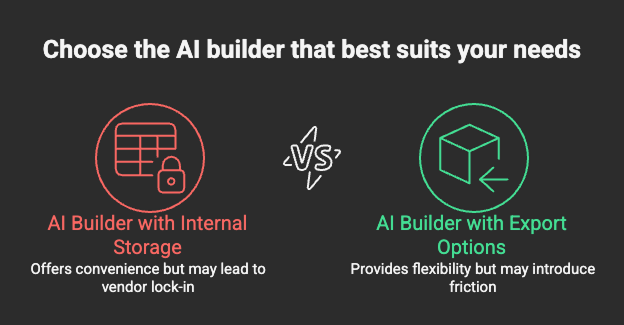
Bootstr.ai generates files and folder structures directly into the GitHub account you connect. The service orchestrates generation but never stores the files — the repository is created under your account, and the contents are immediately visible in your Git history.
How it works:
- 1Connect GitHub (private or org repo) and authorize app access (repo creation & write).
- 2Connect Cursor (paid plan) so code generation and edits run within your Cursor environment.
- 3Write natural language prompts to describe features, pages and integrations.
- 4Bootstr.ai scaffolds folders, files, APIs and tests directly in your GitHub repo.
- 5Open Cursor, iterate, refactor, run tests and deploy from your repo as usual.
Real Use Cases and Practical Recommendations
Below are realistic scenarios where specific platforms shine and where bootstr.ai is the logical choice.
Startup MVP in 48 hours
If you need a demoable product quickly and you plan to own the code long term, bootstr.ai gives you a real advantage: the MVP appears in your GitHub repo and can be iterated by any engineer without migration. Lovable and Bolt are also good choices for quick MVPs, but you will need to move files later if you want to leave the vendor ecosystem.
Internal dashboards and ops tools
DronaHQ and ToolJet are built for this world: they connect to enterprise data sources and simplify CRUD apps. If your product is internal and the team prefers visual editors, choose those. If you require repo-based CI/CD and long-term maintainable code, bootstr.ai gives an advantage because the generated app joins your normal engineering flow.
Mobile-first product with polished UI
FlutterFlow provides powerful UI tooling for mobile experiences. It still requires backend decisions — either a native backend or integrations. If your priority is a highly polished UI and you have a backend team, that route is strong.
Large engineering orgs and security requirements
Organizations that require audit logs, branch protection and strict repository governance benefit from bootstr.ai's GitHub-first approach. Everything remains inside your org, which simplifies compliance and review.
FAQ
Build Anything. Own Everything.
Bootstr.ai is for founders, engineering teams, and agencies that want real code, full control, and a developer-native workflow. Stop prototyping inside someone else's walled garden — let AI scaffold your app into your GitHub account and continue working inside Cursor.
Need help choosing a workflow? Contact our team and we'll show you a live build into a GitHub repo.